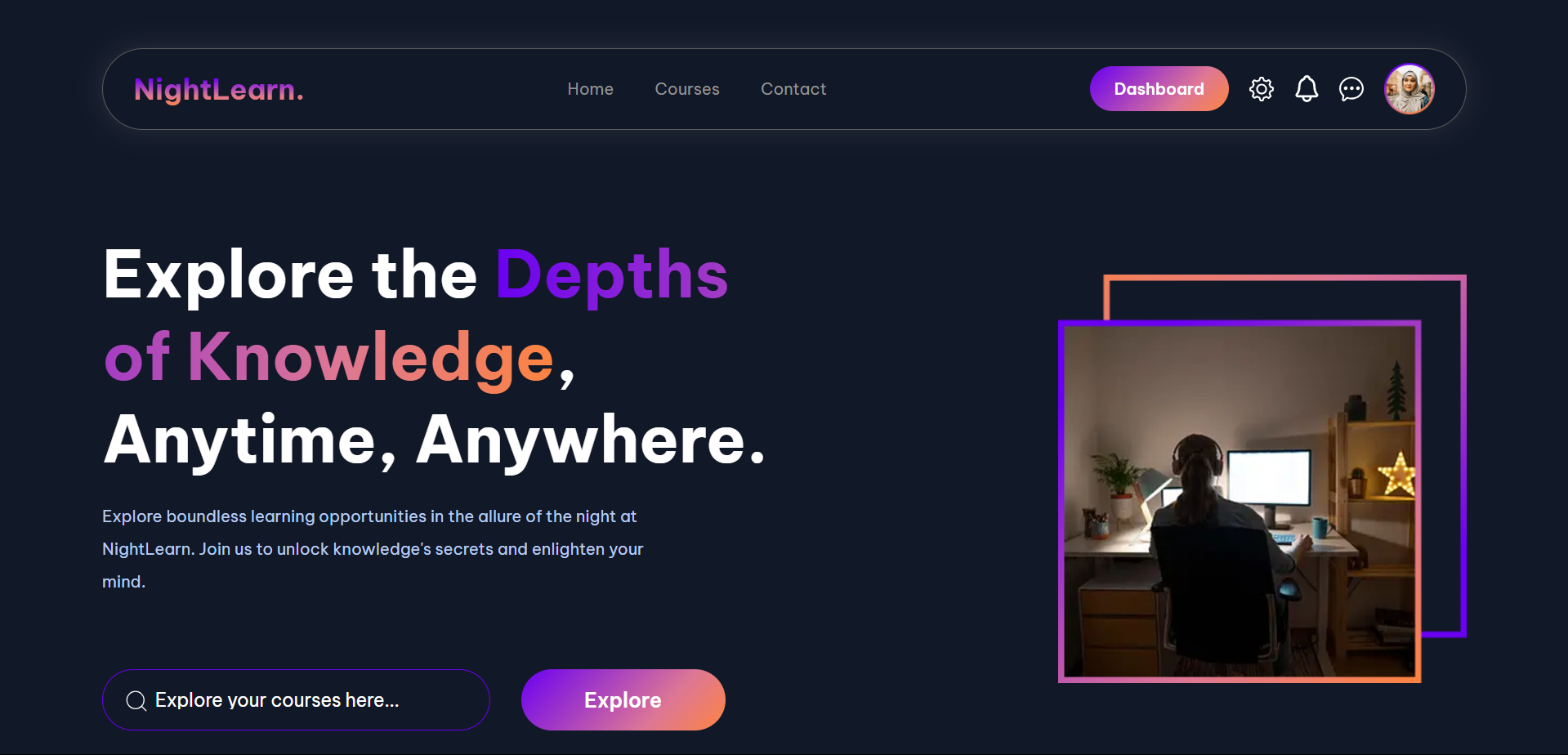
Project Web | Practice your skill
- Slicing UI Design Figma to HTML and CSS
Project kali ini, Kita akan belajar membuat website sederhana namun dengan tampilan UI (User Interface) yang cantik.
Kita akan menggunakan HTML 5 sebagai struktur web dengan menggunakan Semantic HTML, CSS 3 dengan memanfaatkan layouting dengan Flexbox.
Persiapan Awal
- Buat folder project
- Buka dengan vs code
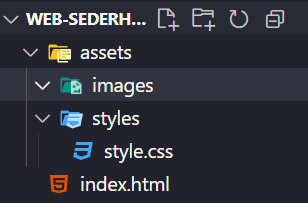
- Buat struktur folder seperti ini
Let’s Code
1. Buat Struktur Project HTML
<!DOCTYPE html>
<html lang="en">
  <head>
    <meta charset="UTF-8" />
    <meta name="viewport" content="width=device-width, initial-scale=1.0" />
    <title>Document</title>
  </head>
  <body></body>
</html>
2. Hello World
<!DOCTYPE html>
<html lang="en">
  <head>
    <meta charset="UTF-8" />
    <meta name="viewport" content="width=device-width, initial-scale=1.0" />
    <title>Document</title>
    <link rel="stylesheet" href="./assets/styles/style.css" />
  </head>
  <body>
    <h1>Hello World</h1>
  </body>
</html>
Penjelasan Kode
Penjelasan Kode
h1untuk menambahkan teks hello world ke website- menyambungkan file html kita dengan css di dalam tag
headdengan menggunakan elementlink
3. Melakukan Reset CSS
Langkah-langkah:
- Buka file style.css dan isikan kode berikut
* {
  margin: 0;
  padding: 0;
  box-sizing: border-box;
}
| Sebelum reset CSS | Sesudah reset CSS |
|---|---|
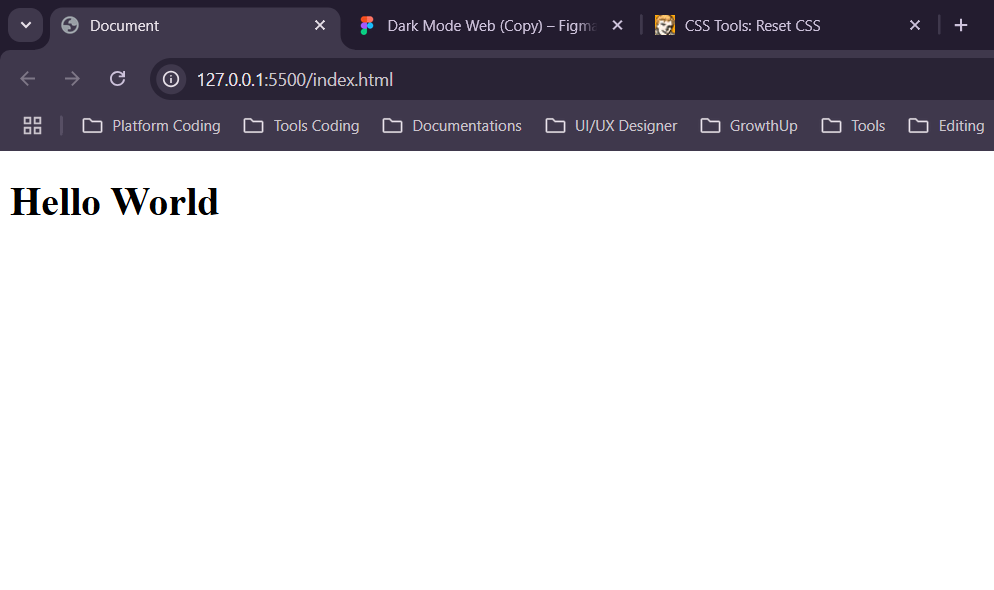 | 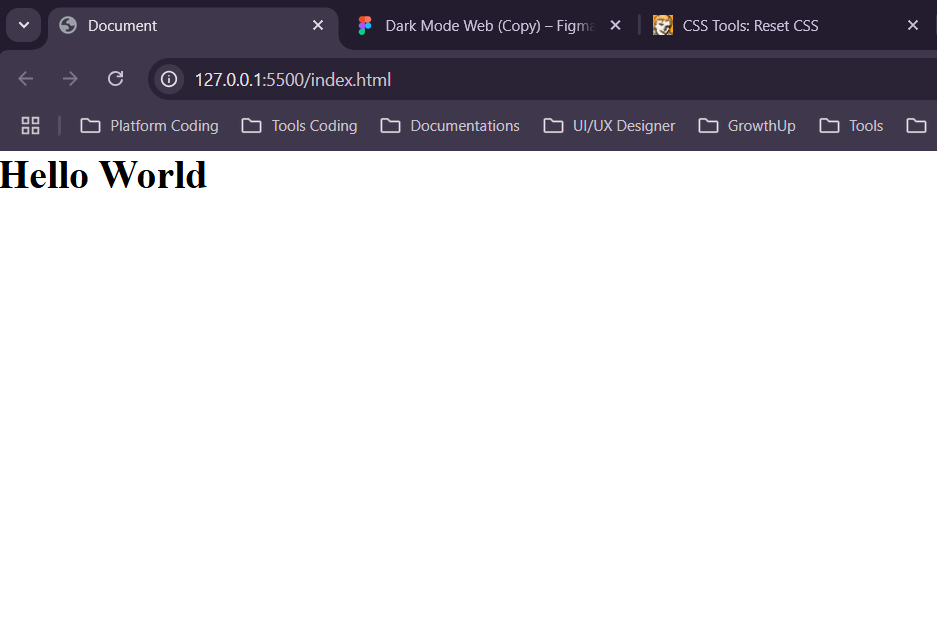 |
4. Import Assets
Export assets yang dibutuhkan seperti gambar dari file figma dan import ke dalam folder assets/images
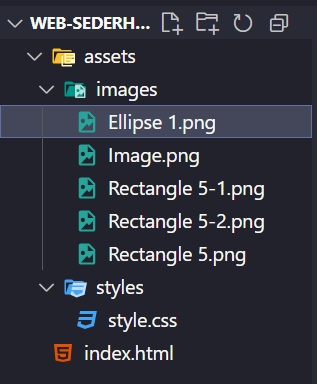
Rename file nya dengan kebab-case format dan jangan ada spasi untuk mengikuti standard file naming convention
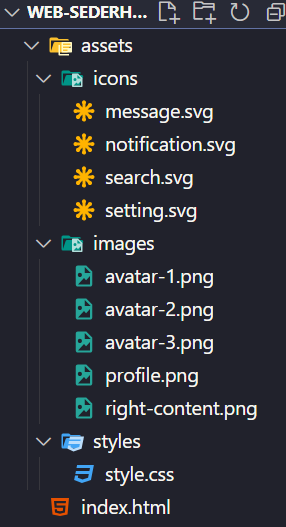
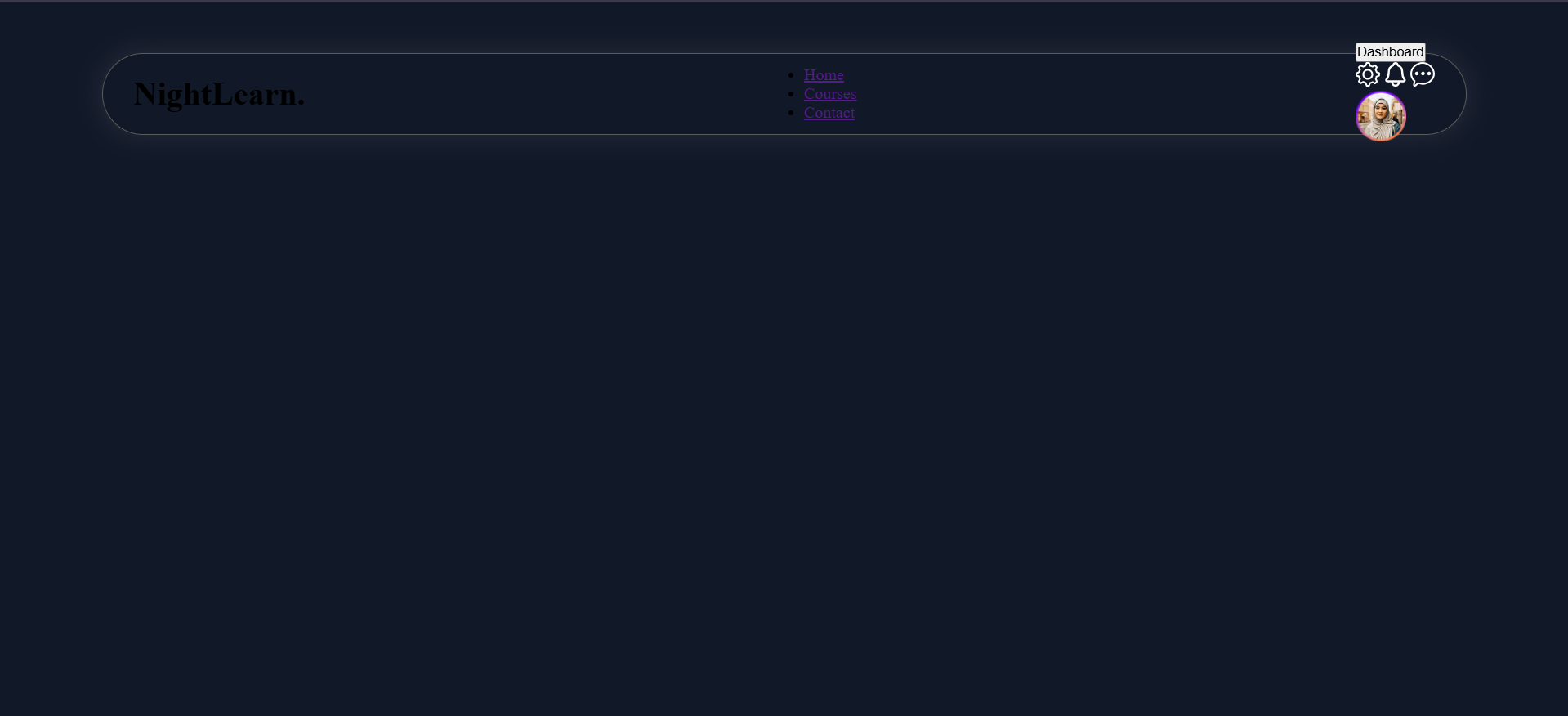
5. Styling Header dan Struktur Element
<!DOCTYPE html>
<html lang="en">
  <head>
    <meta charset="UTF-8" />
    <meta name="viewport" content="width=device-width, initial-scale=1.0" />
    <title>Document</title>
    <link rel="stylesheet" href="./assets/styles/style.css" />
  </head>
  <body>
    <header>
      <div class="logo">
        <h1>NightLearn.</h1>
      </div>
      <nav>
        <ul>
          <li><a href="">Home</a></li>
          <li><a href="">Courses</a></li>
          <li><a href="">Contact</a></li>
        </ul>
      </nav>
      <div class="account">
        <button>Dashboard</button>
        <div class="icons">
          <img src="./assets/icons/setting.svg" alt="setting" />
          <img src="./assets/icons/notification.svg" alt="notification" />
          <img src="./assets/icons/message.svg" alt="message" />
        </div>
        <img src="./assets/images/profile.png" alt="profile" />
      </div>
    </header>
  </body>
</html>
body {
  background-color: #111827;
}

header {
  height: 80px;
  border: 1px solid #5b5b5b;
  -webkit-border-radius: 50px;
  -moz-border-radius: 50px;
  -ms-border-radius: 50px;
  -o-border-radius: 50px;
  border-radius: 50px;
  margin-top: 50px;
  margin-inline: 100px;
  -webkit-box-shadow: 0px 0px 25px 0px rgba(255, 255, 255, 0.1);
  -moz-box-shadow: 0px 0px 25px 0px rgba(255, 255, 255, 0.1);
  box-shadow: 0px 0px 25px 0px rgba(255, 255, 255, 0.1);
  padding-inline: 30px;
  padding-top: 18px;
  padding-bottom: 18px;
  display: flex;
  justify-content: space-between;
  align-items: center;
}
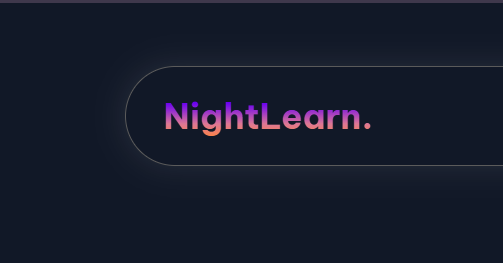
6. Styling Element Logo
.logo h1 {
  background: -webkit-linear-gradient(
    top,
    #6a00f2 20%,
    #dd7795 68%,
    #fe8440 100%
  );
  -webkit-background-clip: text;
  -webkit-text-fill-color: transparent;
  background-clip: text;
  font-size: 28px;
  font-weight: bold;
}
7. Menambahkan Google Font
<link rel="preconnect" href="https://fonts.googleapis.com">
<link rel="preconnect" href="https://fonts.gstatic.com" crossorigin>
<link href="https://fonts.googleapis.com/css2?family=Be+Vietnam+Pro:wght@400;600;700&display=swap" rel="stylesheet">
8. Styling Element Nav
ul {
  list-style-type: none;
  display: flex;
  gap: 40px;
}

a {
  color: #939393;
  -moz-text-decoration-color: transparent;
  text-decoration: underline;
  text-underline-offset: 8px;
  text-decoration-color: transparent;
  -webkit-transition: all 0.3s ease-in-out;
  -moz-transition: all 0.3s ease-in-out;
  -ms-transition: all 0.3s ease-in-out;
  -o-transition: all 0.3s ease-in-out;
  transition: all 0.3s ease-in-out;
}

a:hover {
  text-decoration: underline;
  color: #ffffff;
  text-underline-offset: 8px;
}

9. Styling Element Account
.account {
  display: flex;
  align-items: center;
  justify-content: space-between;
  gap: 20px;
}

.account button {
  background: rgb(106, 0, 242);
  background: linear-gradient(
    133deg,
    rgba(106, 0, 242, 1) 0%,
    rgba(221, 119, 149, 1) 68%,
    rgba(254, 132, 64, 1) 100%
  );
  padding-inline: 24px;
  padding-top: 12px;
  padding-bottom: 12px;
  -webkit-border-radius: 50px;
  -moz-border-radius: 50px;
  -ms-border-radius: 50px;
  -o-border-radius: 50px;
  border-radius: 50px;
  border: none;
  font-size: 16px;
  font-weight: 600;
  color: #ffffff;
}

.icons {
  display: flex;
  align-items: center;
  justify-content: space-between;
  gap: 20px;
}

.icons img {
  width: 24px;
}
.account + img {
  width: 50px;
}
Check Point Header
Keseluruhan Kode
<!DOCTYPE html>
<html lang="en">
  <head>
    <meta charset="UTF-8" />
    <meta name="viewport" content="width=device-width, initial-scale=1.0" />
    <title>Document</title>
    <!-- Google Font Be Vietnam Pro -->
    <link rel="preconnect" href="https://fonts.googleapis.com" />
    <link rel="preconnect" href="https://fonts.gstatic.com" crossorigin />
    <link
      href="https://fonts.googleapis.com/css2?family=Be+Vietnam+Pro:wght@400;600;700&display=swap"
      rel="stylesheet"
    />
    <!-- My Own CSS -->
    <link rel="stylesheet" href="./assets/styles/style.css" />
  </head>
  <body>
    <header>
      <div class="logo">
        <h1>NightLearn.</h1>
      </div>
      <nav>
        <ul>
          <li><a href="">Home</a></li>
          <li><a href="">Courses</a></li>
          <li><a href="">Contact</a></li>
        </ul>
      </nav>
      <div class="account">
        <button>Dashboard</button>
        <div class="icons">
          <img src="./assets/icons/setting.svg" alt="setting" />
          <img src="./assets/icons/notification.svg" alt="notification" />
          <img src="./assets/icons/message.svg" alt="message" />
        </div>
        <img src="./assets/images/profile.png" alt="profile" />
      </div>
    </header>
  </body>
</html>
* {
  margin: 0;
  padding: 0;
  box-sizing: border-box;
  font-family: "Be Vietnam Pro", serif;
}

body {
  background-color: #111827;
}

header {
  height: 80px;
  border: 1px solid #5b5b5b;
  -webkit-border-radius: 50px;
  -moz-border-radius: 50px;
  -ms-border-radius: 50px;
  -o-border-radius: 50px;
  border-radius: 50px;
  margin-top: 50px;
  margin-inline: 100px;
  -webkit-box-shadow: 0px 0px 25px 0px rgba(255, 255, 255, 0.1);
  -moz-box-shadow: 0px 0px 25px 0px rgba(255, 255, 255, 0.1);
  box-shadow: 0px 0px 25px 0px rgba(255, 255, 255, 0.1);
  padding-inline: 30px;
  padding-top: 18px;
  padding-bottom: 18px;
  display: flex;
  justify-content: space-between;
  align-items: center;
}

/*  */
.logo h1 {
  background: -webkit-linear-gradient(
    top,
    #6a00f2 20%,
    #dd7795 68%,
    #fe8440 100%
  );
  -webkit-background-clip: text;
  -webkit-text-fill-color: transparent;
  background-clip: text;
  font-size: 28px;
  font-weight: bold;
}
/*  */

/*  */
ul {
  list-style-type: none;
  display: flex;
  gap: 40px;
}

a {
  color: #939393;
  -moz-text-decoration-color: transparent;
  text-decoration: underline;
  text-underline-offset: 8px;
  text-decoration-color: transparent;
  -webkit-transition: all 0.3s ease-in-out;
  -moz-transition: all 0.3s ease-in-out;
  -ms-transition: all 0.3s ease-in-out;
  -o-transition: all 0.3s ease-in-out;
  transition: all 0.3s ease-in-out;
}

a:hover {
  text-decoration: underline;
  color: #ffffff;
  text-underline-offset: 8px;
}
/*  */

.account {
  display: flex;
  align-items: center;
  justify-content: space-between;
  gap: 20px;
}

.account button {
  background: rgb(106, 0, 242);
  background: linear-gradient(
    133deg,
    rgba(106, 0, 242, 1) 0%,
    rgba(221, 119, 149, 1) 68%,
    rgba(254, 132, 64, 1) 100%
  );
  padding-inline: 24px;
  padding-top: 12px;
  padding-bottom: 12px;
  -webkit-border-radius: 50px;
  -moz-border-radius: 50px;
  -ms-border-radius: 50px;
  -o-border-radius: 50px;
  border-radius: 50px;
  border: none;
  font-size: 16px;
  font-weight: 600;
  color: #ffffff;
}

.icons {
  display: flex;
  align-items: center;
  justify-content: space-between;
  gap: 20px;
}

.icons img {
  width: 24px;
}
.account + img {
  width: 50px;
}

10. Buat Struktur Element Main dan Child nya
<!DOCTYPE html>
<html lang="en">
  <head>
    <meta charset="UTF-8" />
    <meta name="viewport" content="width=device-width, initial-scale=1.0" />
    <title>Document</title>
    <!-- Google Font Be Vietnam Pro -->
    <link rel="preconnect" href="https://fonts.googleapis.com" />
    <link rel="preconnect" href="https://fonts.gstatic.com" crossorigin />
    <link
      href="https://fonts.googleapis.com/css2?family=Be+Vietnam+Pro:wght@400;600;700&display=swap"
      rel="stylesheet"
    />
    <!-- My Own CSS -->
    <link rel="stylesheet" href="./assets/styles/style.css" />
  </head>
  <body>
    <!-- Start Section of Header -->
    <header>
      <!-- Another Codes -->
    </header>
    <!-- End Section of Header -->

    **<!-- Start Section of Main -->**
    <main>
      <article>
        <h1>
          Explore the <span>Depths of Knowledge</span>, Anytime, Anywhere.
        </h1>
        <p>
          Explore boundless learning opportunities in the allure of the night at
          NightLearn. Join us to unlock knowledge's secrets and enlighten your
          mind.
        </p>
        <form action="#">
          <div class="input-wrapper">
            <label for="search"
              ><img src="./assets/icons/search.svg" alt="search"
            /></label>
            <input
              type="text"
              id="search"
              placeholder="Explore your courses here..."
            />
          </div>
          <button type="submit">Explore</button>
        </form>
      </article>
      <aside>
        <img src="./assets/images/right-content.png" alt="right-content" />
      </aside>
    </main>
    **<!-- End Section of Main -->**
  </body>
</html>
11. Styling Element Main dan child
main {
  margin-top: 100px;
  margin-inline: 100px;
  display: flex;
  justify-content: space-between;
}

main article {
  width: 665px;
}

main article h1 {
  font-size: 64px;
  font-weight: bold;
  color: #ffffff;
}

main article h1 span {
  background: -webkit-linear-gradient(
    left,
    #6a00f2 0%,
    #dd7795 68%,
    #fe8440 100%
  );
  -webkit-background-clip: text;
  -webkit-text-fill-color: transparent;
  background-clip: text;
}

main article p {
  color: #b8cbf1;
  width: 556px;
  line-height: 32px;
  margin-bottom: 70px;
  margin-top: 20px;
}

main article form {
  width: 610px;
  height: 60px;
  display: flex;
  justify-content: space-between;
  align-items: center;
  gap: 30px;
}

.input-wrapper {
  height: 100%;
  width: 380px;
  border: 1px solid #6a00f2;
  -webkit-border-radius: 100px;
  -moz-border-radius: 100px;
  -ms-border-radius: 100px;
  -o-border-radius: 100px;
  border-radius: 100px;
  padding-inline: 22px;
  padding-top: 20px;
  padding-bottom: 20px;
  display: flex;
  gap: 4px;
}

.input-wrapper input {
  background-color: transparent;
  border: none;
  color: #ffffff;
  font-size: 18px;
  width: 100%;
}

.input-wrapper input::placeholder {
  color: #ffffff;
  font-size: 18px;
}

main article form button {
  background: rgb(106, 0, 242);
  background: linear-gradient(
    133deg,
    rgba(106, 0, 242, 1) 0%,
    rgba(221, 119, 149, 1) 68%,
    rgba(254, 132, 64, 1) 100%
  );
  padding-inline: 24px;
  padding-top: 12px;
  padding-bottom: 12px;
  -webkit-border-radius: 50px;
  -moz-border-radius: 50px;
  -ms-border-radius: 50px;
  -o-border-radius: 50px;
  border-radius: 50px;
  border: none;
  font-size: 20px;
  font-weight: 600;
  color: #ffffff;
  width: 200px;
  height: 60px;
}

main aside {
  align-self: center;
}
Checkpoint Main
Keseluruhan Code
<!DOCTYPE html>
<html lang="en">
  <head>
    <meta charset="UTF-8" />
    <meta name="viewport" content="width=device-width, initial-scale=1.0" />
    <title>Document</title>
    <!-- Google Font Be Vietnam Pro -->
    <link rel="preconnect" href="https://fonts.googleapis.com" />
    <link rel="preconnect" href="https://fonts.gstatic.com" crossorigin />
    <link
      href="https://fonts.googleapis.com/css2?family=Be+Vietnam+Pro:wght@400;600;700&display=swap"
      rel="stylesheet"
    />
    <!-- My Own CSS -->
    <link rel="stylesheet" href="./assets/styles/style.css" />
  </head>
  <body>
    <!-- Start Section of Header -->
    <header>
      <div class="logo">
        <h1>NightLearn.</h1>
      </div>
      <nav>
        <ul>
          <li><a href="">Home</a></li>
          <li><a href="">Courses</a></li>
          <li><a href="">Contact</a></li>
        </ul>
      </nav>
      <div class="account">
        <button>Dashboard</button>
        <div class="icons">
          <img src="./assets/icons/setting.svg" alt="setting" />
          <img src="./assets/icons/notification.svg" alt="notification" />
          <img src="./assets/icons/message.svg" alt="message" />
        </div>
        <img src="./assets/images/profile.png" alt="profile" />
      </div>
    </header>
    <!-- End Section of Header -->

    <!-- Start Section of Main -->
    <main>
      <article>
        <h1>
          Explore the <span>Depths of Knowledge</span>, Anytime, Anywhere.
        </h1>
        <p>
          Explore boundless learning opportunities in the allure of the night at
          NightLearn. Join us to unlock knowledge's secrets and enlighten your
          mind.
        </p>
        <form action="#">
          <div class="input-wrapper">
            <label for="search"
              ><img src="./assets/icons/search.svg" alt="search"
            /></label>
            <br />
            <input
              type="text"
              id="search"
              placeholder="Explore your courses here..."
            />
          </div>
          <button type="submit">Explore</button>
        </form>
      </article>
      <aside>
        <img src="./assets/images/right-content.png" alt="right-content" />
      </aside>
    </main>
    <!-- End Section of Main -->
  </body>
</html>
/* Reset CSS */
* {
  margin: 0;
  padding: 0;
  box-sizing: border-box;
  font-family: "Be Vietnam Pro", serif;
}

body {
  background-color: #111827;
}

/* Start Style of Header */
header {
  height: 80px;
  border: 1px solid #5b5b5b;
  -webkit-border-radius: 50px;
  -moz-border-radius: 50px;
  -ms-border-radius: 50px;
  -o-border-radius: 50px;
  border-radius: 50px;
  margin-top: 50px;
  margin-inline: 100px;
  -webkit-box-shadow: 0px 0px 25px 0px rgba(255, 255, 255, 0.1);
  -moz-box-shadow: 0px 0px 25px 0px rgba(255, 255, 255, 0.1);
  box-shadow: 0px 0px 25px 0px rgba(255, 255, 255, 0.1);
  padding-inline: 30px;
  padding-top: 18px;
  padding-bottom: 18px;
  display: flex;
  justify-content: space-between;
  align-items: center;
}

.logo h1 {
  background: -webkit-linear-gradient(
    top,
    #6a00f2 20%,
    #dd7795 68%,
    #fe8440 100%
  );
  -webkit-background-clip: text;
  -webkit-text-fill-color: transparent;
  background-clip: text;
  font-size: 28px;
  font-weight: bold;
}

ul {
  list-style-type: none;
  display: flex;
  gap: 40px;
}

a {
  color: #939393;
  -moz-text-decoration-color: transparent;
  text-decoration: underline;
  text-underline-offset: 8px;
  text-decoration-color: transparent;
  -webkit-transition: all 0.3s ease-in-out;
  -moz-transition: all 0.3s ease-in-out;
  -ms-transition: all 0.3s ease-in-out;
  -o-transition: all 0.3s ease-in-out;
  transition: all 0.3s ease-in-out;
}

a:hover {
  text-decoration: underline;
  color: #ffffff;
  text-underline-offset: 8px;
}

.account {
  display: flex;
  align-items: center;
  justify-content: space-between;
  gap: 20px;
}

.account button {
  background: rgb(106, 0, 242);
  background: linear-gradient(
    133deg,
    rgba(106, 0, 242, 1) 0%,
    rgba(221, 119, 149, 1) 68%,
    rgba(254, 132, 64, 1) 100%
  );
  padding-inline: 24px;
  padding-top: 12px;
  padding-bottom: 12px;
  -webkit-border-radius: 50px;
  -moz-border-radius: 50px;
  -ms-border-radius: 50px;
  -o-border-radius: 50px;
  border-radius: 50px;
  border: none;
  font-size: 16px;
  font-weight: 600;
  color: #ffffff;
}

.icons {
  display: flex;
  align-items: center;
  justify-content: space-between;
  gap: 20px;
}

.icons img {
  width: 24px;
}
.account + img {
  width: 50px;
}
/* End Style of Header */

/* Start Style of Main */
main {
  margin-top: 100px;
  margin-inline: 100px;
  display: flex;
  justify-content: space-between;
}

main article {
  width: 665px;
}

main article h1 {
  font-size: 64px;
  font-weight: bold;
  color: #ffffff;
}

main article h1 span {
  background: -webkit-linear-gradient(
    left,
    #6a00f2 0%,
    #dd7795 68%,
    #fe8440 100%
  );
  -webkit-background-clip: text;
  -webkit-text-fill-color: transparent;
  background-clip: text;
}

main article p {
  color: #b8cbf1;
  width: 556px;
  line-height: 32px;
  margin-bottom: 70px;
  margin-top: 20px;
}

main article form {
  width: 610px;
  height: 60px;
  display: flex;
  justify-content: space-between;
  align-items: center;
  gap: 30px;
}

.input-wrapper {
  height: 100%;
  width: 380px;
  border: 1px solid #6a00f2;
  -webkit-border-radius: 100px;
  -moz-border-radius: 100px;
  -ms-border-radius: 100px;
  -o-border-radius: 100px;
  border-radius: 100px;
  padding-inline: 22px;
  padding-top: 20px;
  padding-bottom: 20px;
  display: flex;
  gap: 4px;
}

.input-wrapper input {
  background-color: transparent;
  border: none;
  color: #ffffff;
  font-size: 18px;
  width: 100%;
}

.input-wrapper input::placeholder {
  color: #ffffff;
  font-size: 18px;
}

main article form button {
  background: rgb(106, 0, 242);
  background: linear-gradient(
    133deg,
    rgba(106, 0, 242, 1) 0%,
    rgba(221, 119, 149, 1) 68%,
    rgba(254, 132, 64, 1) 100%
  );
  padding-inline: 24px;
  padding-top: 12px;
  padding-bottom: 12px;
  -webkit-border-radius: 50px;
  -moz-border-radius: 50px;
  -ms-border-radius: 50px;
  -o-border-radius: 50px;
  border-radius: 50px;
  border: none;
  font-size: 20px;
  font-weight: 600;
  color: #ffffff;
  width: 200px;
  height: 60px;
}

main aside {
  align-self: center;
}
/* End Style of Main */